Today, In this article we explain to you how to create CRUD operation example using laravel with google firebase(Laravel 8 CRUD Operation Example Using Google Firebase). we will perform crud operation with a firebase realtime database such as real-time fetch data, create, read, updates and delete or destroy.
If you want to connect or integrate with the firebase database then you have to create a firebase project. so we shared configuration settings of firebase database steps for that. you can follow the below steps for laravel crud operation using firebase.
Overview
Step 1: Create a Firebase Project
Step 2: Install Laravel
Step 3: Configure Firebase Settings
Step 4: Create Route
Step 5: Create a Controller
Step 6: Create Blade Files
Step 7: Run Our Laravel Application
Step 1: Create a Firebase Project
First, we have to create a firebase project. so go to https://firebase.google.com/ and create the project.
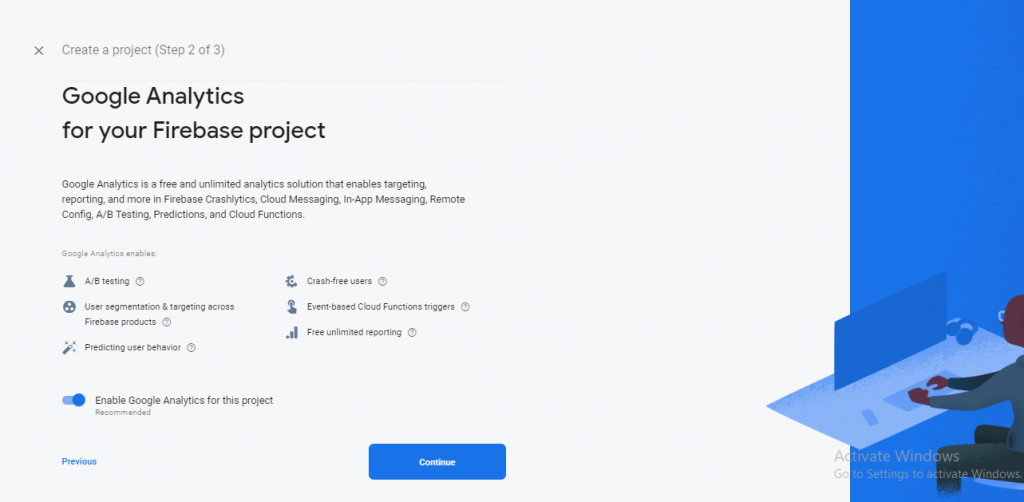
Step 1: In this step, Enter your project name and click the “Continue” button. so you can see below the screenshot.

Step 2: Here, you can also click the “Continue” button. so you can see below the screenshot.
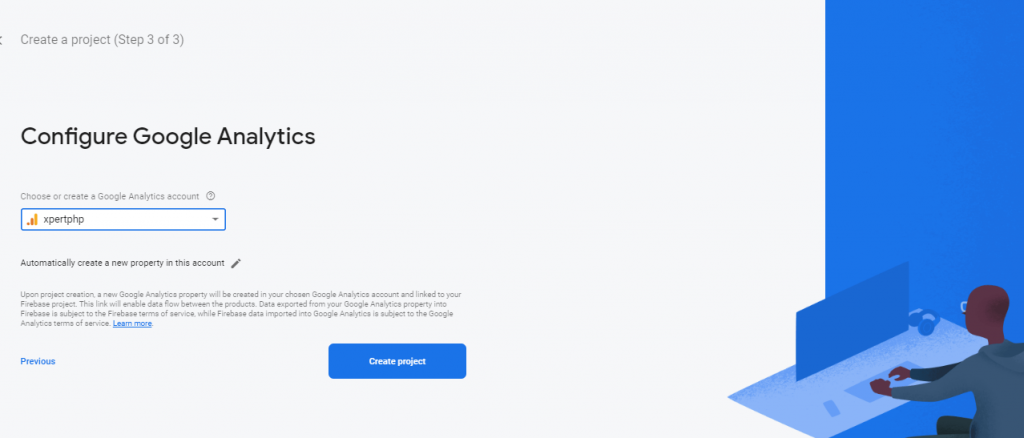
Step 3: In this step, you click on the “create product” button, and after then google firebase project will successfully be created. so you can see below the screenshot.
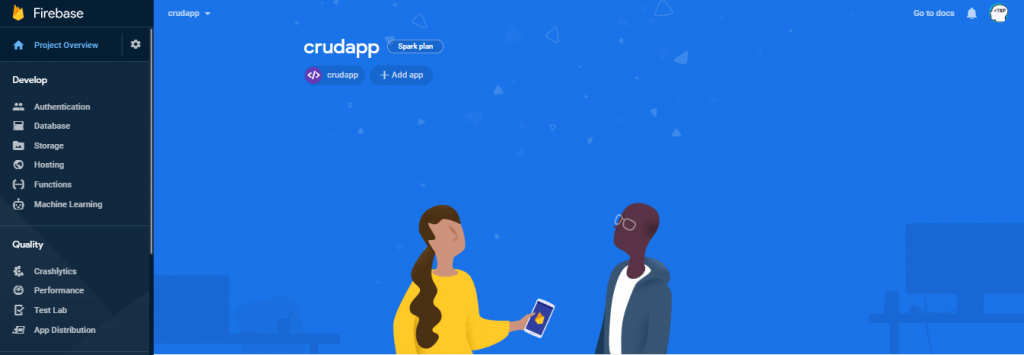
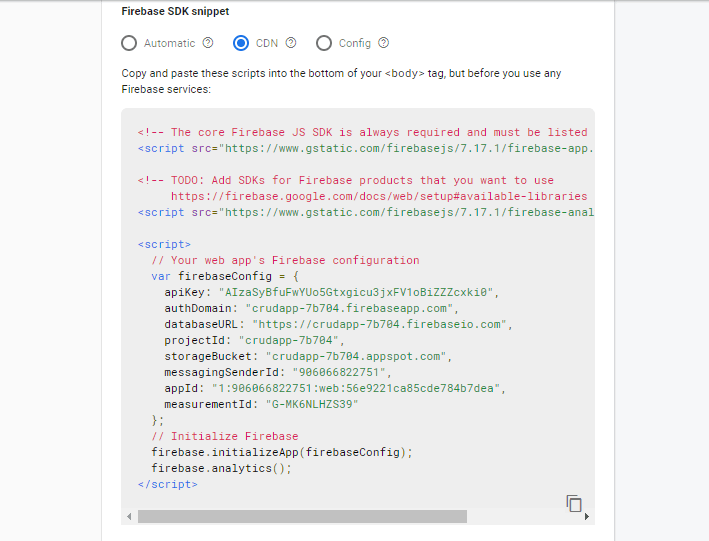
Now click on your web app setting icon (if you not created a web app then you can create it) and after you can get apiKey, auth domain, database URL on select CDN radio button.
Step 2: Install Laravel
We are going to install laravel 8, so first open the command prompt or terminal and go to xampp htdocs folder directory using the command prompt. after then run the below command.
composer create-project --prefer-dist laravel/laravel laravel7_crud_google_firebase
Step 3: Configure Firebase Settings
After the complete installation of laravel. we have to google firebase configuration. now we will open the config/services.php file and paste the below code.
config/services.php
'firebase' => [
    'api_key' => 'api_key',
    'auth_domain' => 'auth_domain',
    'database_url' => 'database_url',
    'project_id' => 'project_id',
    'storage_bucket' => 'storage_bucket',
    'messaging_sender_id' => 'messaging_sender_id',
    'app_id' => 'app_id',
    'measurement_id' => 'measurement_id',
],
Step 4: Create Route
Add the following route code in the “routes/web.php” file.
<?php
use App\Http\Controllers\HomeController;

use Illuminate\Support\Facades\Route;

/*
|--------------------------------------------------------------------------
| Web Routes
|--------------------------------------------------------------------------
|
| Here is where you can register web routes for your application. These
| routes are loaded by the RouteServiceProvider within a group which
| contains the "web" middleware group. Now create something great!
|
*/

Route::get('/', function () {
    return view('welcome');
});

Route::get('users',[HomeController::class, 'users']);
?>
Step 5: Create a Controller
Here below command help to create the controller.
php artisan make:controller HomeController
HomeController.php
<?php

namespace App\Http\Controllers;

use Illuminate\Http\Request;

class HomeController extends Controller
{
    public function users()
    {
        return view('userdetails');
    }
}
?>
Step 6: Create Blade Files
Finally, We will create the userdetails.blade.php file in the “resources/views/” folder directory and paste the below code.
userdetails.blade.php
<!doctype html>
<html lang="en">
<head>
 <title>Laravel 8 CRUD Operation Example Using Google Firebase - XeprtPhp</title>
  <meta charset="utf-8">
  <meta name="viewport" content="width=device-width, initial-scale=1">
  <link rel="stylesheet" href="https://maxcdn.bootstrapcdn.com/bootstrap/4.5.0/css/bootstrap.min.css">
  <script src="https://ajax.googleapis.com/ajax/libs/jquery/3.5.1/jquery.min.js"></script>
  <script src="https://cdnjs.cloudflare.com/ajax/libs/popper.js/1.16.0/umd/popper.min.js"></script>
  <script src="https://maxcdn.bootstrapcdn.com/bootstrap/4.5.0/js/bootstrap.min.js"></script>
</head>
<body>
	<div class="container">
		<div class="row">
			<div class="col-md-4">
				<div class="card card-default">
					<div class="card-header">
						<div class="row">
							<div class="col-md-10">
								<strong>Add User</strong>
							</div>
						</div>
					</div>
					<div class="card-body">
						<form id="addUser" class="" method="POST" action="">
							<div class="form-group">
								<label for="first_name" class="col-md-12 col-form-label">First Name</label>

								<div class="col-md-12">
									<input id="first_name" type="text" class="form-control" name="first_name" value="" required autofocus>
								</div>
							</div>
							<div class="form-group">
								<label for="last_name" class="col-md-12 col-form-label">Last Name</label>

								<div class="col-md-12">
									<input id="last_name" type="text" class="form-control" name="last_name" value="" required autofocus>
								</div>
							</div>
							<div class="form-group">
								<div class="col-md-12 col-md-offset-3">
									<button type="button" class="btn btn-primary btn-block desabled" id="submitUser">
										Submit
									</button>
								</div>
							</div>
						</form>
					</div>
				</div>
			</div>
			<div class="col-md-8">
				<div class="card card-default">
					<div class="card-header">
						<div class="row">
							<div class="col-md-10">
								<strong>All Users Listing</strong>
							</div>
						</div>
					</div>

					<div class="card-body">
						<table class="table table-bordered">
							<tr>
								<th>First Name</th>
								<th>Last Name</th>
								<th width="180" class="text-center">Action</th>
							</tr>
							<tbody id="tbody">

							</tbody>
						</table>
					</div>
				</div>
			</div>
		</div>
	</div>

	<!-- Delete Model -->
	<form action="" method="POST" class="users-remove-record-model">
		<div id="remove-modal" class="modal fade" tabindex="-1" role="dialog" aria-labelledby="custom-width-modalLabel" aria-hidden="true" style="display: none;">
			<div class="modal-dialog" style="width:55%;">
				<div class="modal-content">
					<div class="modal-header">
						<h4 class="modal-title" id="custom-width-modalLabel">Delete Record</h4>
						<button type="button" class="close remove-data-from-delete-form" data-dismiss="modal" aria-hidden="true">×</button>
					</div>
					<div class="modal-body">
						<h4>You Want You Sure Delete This Record?</h4>
					</div>
					<div class="modal-footer">
						<button type="button" class="btn btn-default waves-effect remove-data-from-delete-form" data-dismiss="modal">Close</button>
						<button type="button" class="btn btn-danger waves-effect waves-light deleteMatchRecord">Delete</button>
					</div>
				</div>
			</div>
		</div>
	</form>

	<!-- Update Model -->
	<form action="" method="POST" class="users-update-record-model form-horizontal">
		<div id="update-modal" class="modal fade" tabindex="-1" role="dialog" aria-labelledby="custom-width-modalLabel" aria-hidden="true" style="display: none;">
			<div class="modal-dialog" style="width:55%;">
				<div class="modal-content" style="overflow: hidden;">
					<div class="modal-header">
						<h4 class="modal-title" id="custom-width-modalLabel">Update Record</h4>
						<button type="button" class="close update-data-from-delete-form" data-dismiss="modal" aria-hidden="true">×</button>
					</div>
					<div class="modal-body" id="updateBody">

					</div>
					<div class="modal-footer">
						<button type="button" class="btn btn-default waves-effect update-data-from-delete-form" data-dismiss="modal">Close</button>
						<button type="button" class="btn btn-success waves-effect waves-light updateUserRecord">Update</button>
					</div>
				</div>
			</div>
		</div>
	</form>
	<script src="https://www.gstatic.com/firebasejs/4.9.1/firebase.js"></script>
	<script>
	// Your web app's Firebase configuration
	var config = {
		apiKey: "{{ config('services.firebase.api_key') }}",
				authDomain: "{{ config('services.firebase.auth_domain') }}",
				databaseURL: "{{ config('services.firebase.database_url') }}",
				projectId: "{{ config('services.firebase.project_id') }}",
				storageBucket: "{{ config('services.firebase.storage_bucket') }}",
				messagingSenderId: "{{ config('services.firebase.messaging_sender_id') }}",
				appId: "{{ config('services.firebase.app_id') }}",
				measurementId: "{{ config('services.firebase.measurement_id') }}"
	};
	// Initialize Firebase
	firebase.initializeApp(config);

	var database = firebase.database();

	var lastIndex = 0;

	// Get Data
	firebase.database().ref('users/').on('value', function(snapshot) {
		var value = snapshot.val();
		var htmls = [];
		$.each(value, function(index, value){
			if(value) {
				htmls.push('<tr>\
					<td>'+ value.first_name +'</td>\
					<td>'+ value.last_name +'</td>\
					<td><a data-toggle="modal" data-target="#update-modal" class="btn btn-outline-success updateData" data-id="'+index+'">Update</a>\
					<a data-toggle="modal" data-target="#remove-modal" class="btn btn-outline-danger removeData" data-id="'+index+'">Delete</a></td>\
				</tr>');
			}
			lastIndex = index;
		});
		$('#tbody').html(htmls);
		$("#submitUser").removeClass('desabled');
	});


	// Add Data
	$('#submitUser').on('click', function(){
		var values = $("#addUser").serializeArray();
		var first_name = values[0].value;
		var last_name = values[1].value;
		var userID = lastIndex+1;

		firebase.database().ref('users/' + userID).set({
			first_name: first_name,
			last_name: last_name,
		});

		// Reassign lastID value
		lastIndex = userID;
		$("#addUser input").val("");
	});

	// Update Data
	var updateID = 0;
	$('body').on('click', '.updateData', function() {
		updateID = $(this).attr('data-id');
		firebase.database().ref('users/' + updateID).on('value', function(snapshot) {
			var values = snapshot.val();
			var updateData = '<div class="form-group">\
					<label for="first_name" class="col-md-12 col-form-label">First Name</label>\
					<div class="col-md-12">\
						<input id="first_name" type="text" class="form-control" name="first_name" value="'+values.first_name+'" required autofocus>\
					</div>\
				</div>\
				<div class="form-group">\
					<label for="last_name" class="col-md-12 col-form-label">Last Name</label>\
					<div class="col-md-12">\
						<input id="last_name" type="text" class="form-control" name="last_name" value="'+values.last_name+'" required autofocus>\
					</div>\
				</div>';

				$('#updateBody').html(updateData);
		});
	});

	$('.updateUserRecord').on('click', function() {
		var values = $(".users-update-record-model").serializeArray();
		var postData = {
			first_name : values[0].value,
			last_name : values[1].value,
		};

		var updates = {};
		updates['/users/' + updateID] = postData;

		firebase.database().ref().update(updates);

		$("#update-modal").modal('hide');
	});


	// Remove Data
	$("body").on('click', '.removeData', function() {
		var id = $(this).attr('data-id');
		$('body').find('.users-remove-record-model').append('<input name="id" type="hidden" value="'+ id +'">');
	});

	$('.deleteMatchRecord').on('click', function(){
		var values = $(".users-remove-record-model").serializeArray();
		var id = values[0].value;
		firebase.database().ref('users/' + id).remove();
		$('body').find('.users-remove-record-model').find( "input" ).remove();
		$("#remove-modal").modal('hide');
	});
	$('.remove-data-from-delete-form').click(function() {
		$('body').find('.users-remove-record-model').find( "input" ).remove();
	});
	</script>
</body>
</html>
Step 7: Run Our Laravel Application
We can start the server and run this example using the below command.
php artisan serve
Now we will run our example using the below Url in the browser.
http://127.0.0.1:8000/users
Search
Tools
Category
Latest Post
Popular Post
- Angular 10 – Can’t bind to ‘formGroup’ since it isn’t a known property of ‘form’
- Php Login And Registration Example
- Codeigniter 3 Deprecated dynamic properties in PHP 8.2
- PHP Registration with Email Verification using OTP
- Laravel 11 Ajax CRUD Example
- How to add multiple markers in google maps using Codeigniter
- Angular 15 CRUD Application Example Tutorial
- Laravel 12 Ajax CRUD Example